
Jonathan's Gem Enchanting vs. The Hammer's Legendary Tomes
Jonathan's gem enchantment requires holding a gem directly from your Gems tab. Enhancement Tomes sit in a separate Tomes tab and cannot be used as substitute materials for Jonathan's service.
To use your Legendary Tomes, travel to The Pale and locate The Hammer inside The Metal Hut. Speak with him and complete the quest Ugly Work to unlock his enhancement service.
Find The Hammer in The Metal Hut in The Pale
Travel to The Pale and head toward HUD Position coordinates around x ≈ 2940, z ≈ -90 to approach the area. Once nearby, locate The Metal Hut by the colored glowing panel beside its entrance door, then head inside to find The Hammer.
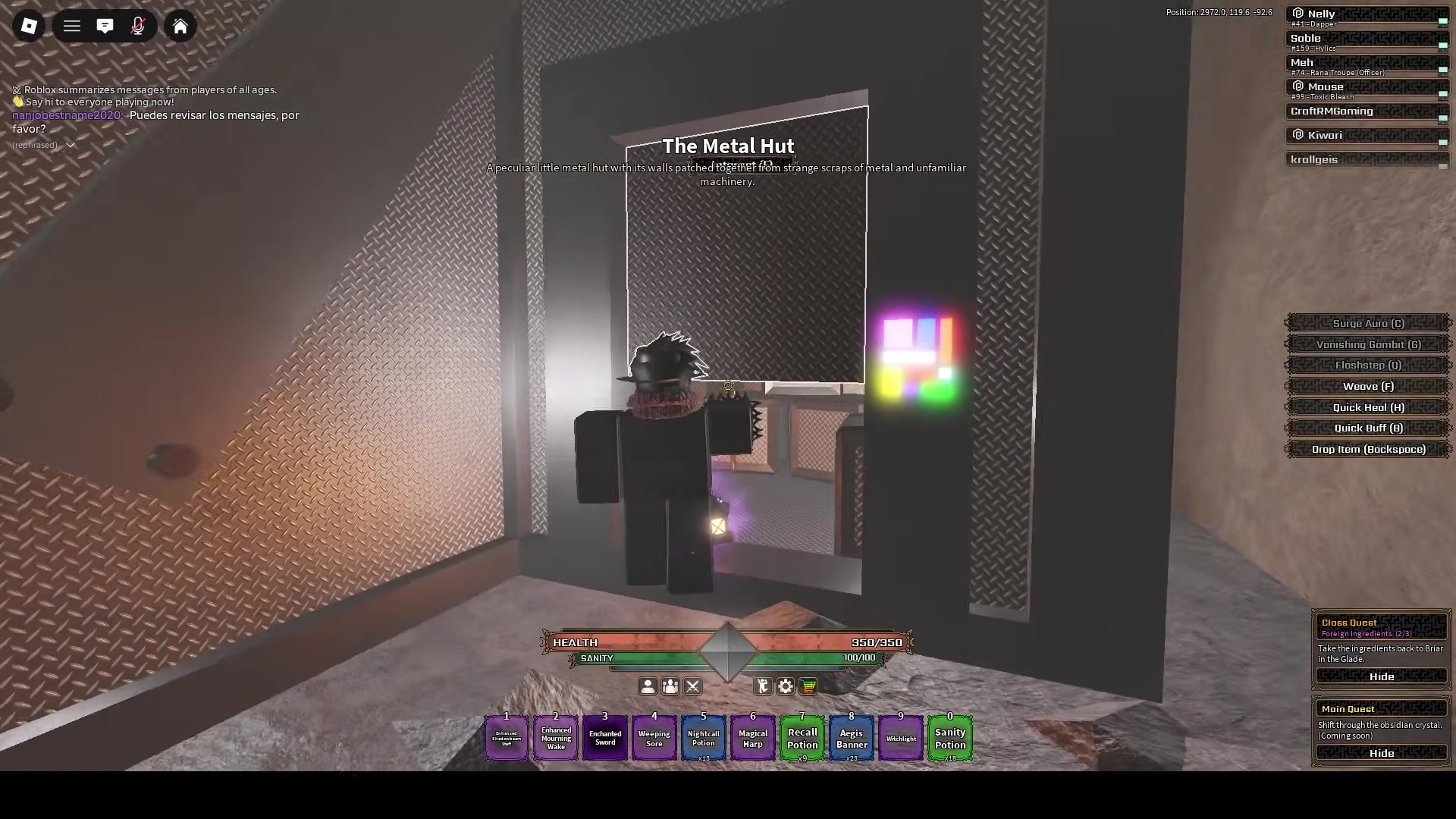
The x and z coordinates serve as a reference to help you approach the hut, but your primary visual landmark is the colored glowing panel beside the metal entrance door. Once inside, an approximate HUD Position readout around (2940, 120, -88) confirms you have reached the right room.
Unlock Premium Enhancement Through Ugly Work
Speaking with The Hammer gives you the quest Ugly Work (1/2), requiring you to eliminate 250 aliens within The Pale. Any alien enemy type in The Pale counts toward the objective, so rely on your HUD counter to track qualifying kills.
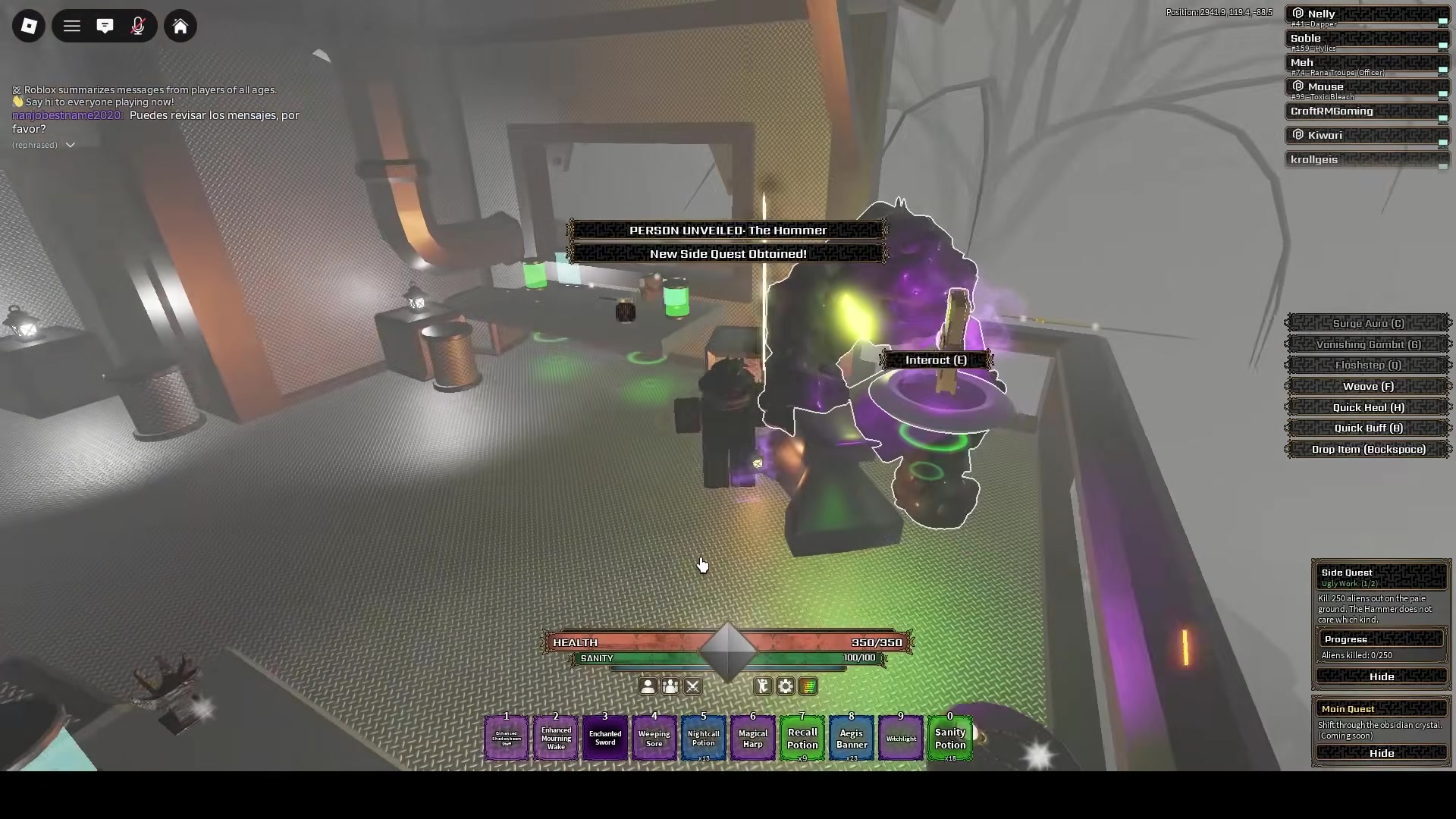
After reaching 250 kills, your HUD updates to Ugly Work (2/2). Return to The Metal Hut and speak with The Hammer to turn in the quest, which awards Premium Enhancement Access and 1,000 Ichor.
One possible approach is teleporting to The Stony Shells at night and using a Nightcall Potion while watching your quest counter. Potions are strictly optional, and you can defeat aliens across The Pale without them.
The Hammer Enhancement Process and Ugly Work in The Pale
Preview in-game menus, stats, routes, and gameplay footage.
Playing loads YouTube’s video player. You can also open the original video.
How to Use Legendary Tomes in The Veil Step by Step
Once you unlock Premium Enhancement Access, speak to The Hammer to begin. In his dialogue, he asks for your target equipment first before prompting you to choose your Tome.
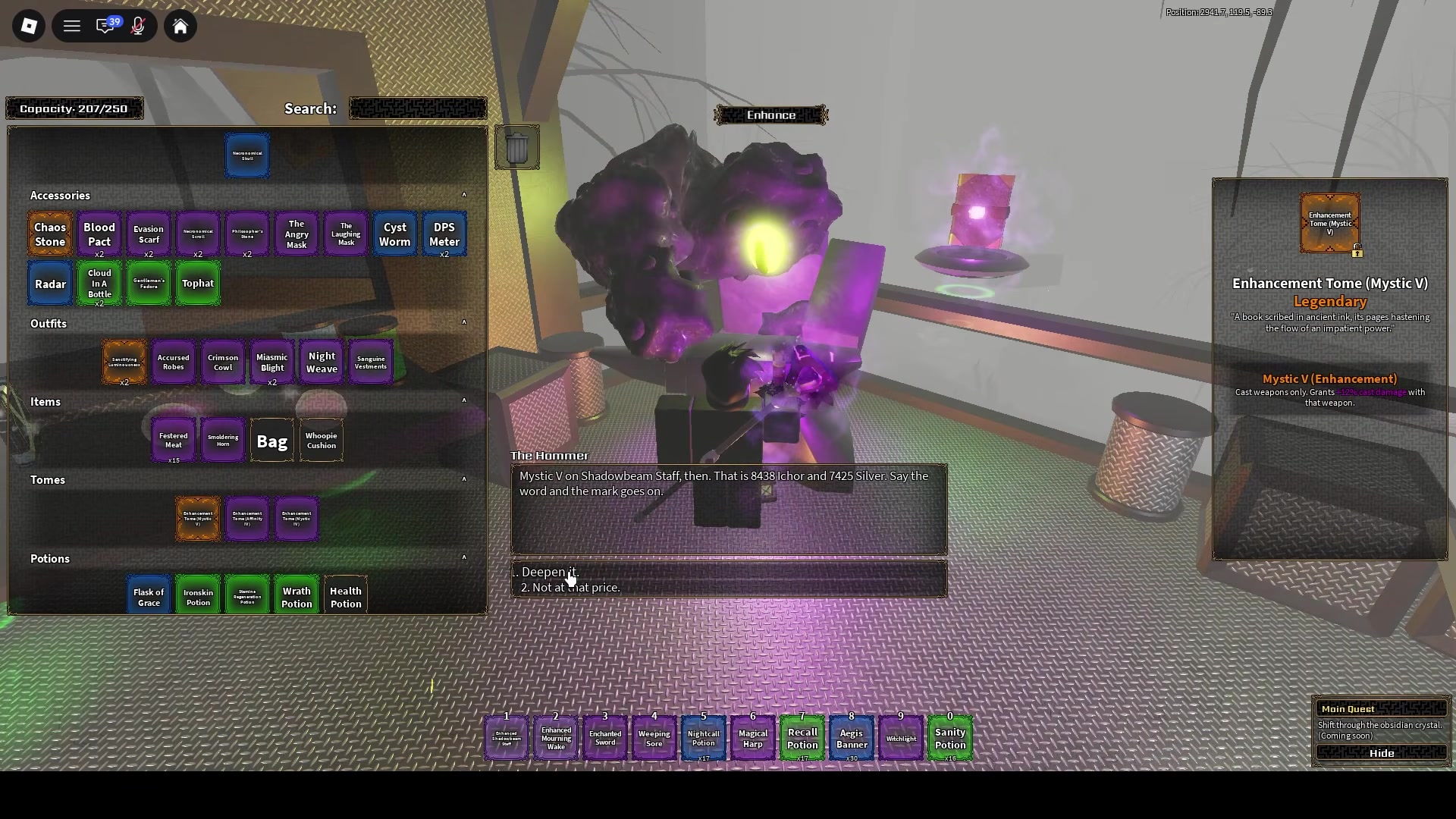
In one example, pairing a Shadowbeam Staff with the Legendary Enhancement Tome (Mystic V) shows a Cast weapons only requirement, grants +12% cast damage, and quotes 8,438 Ichor and 7,425 Silver. Check the exact Ichor and Silver costs shown in your own active dialogue rather than assuming a fixed fee.
Initiate Enhancement Service
Speak to The Hammer inside The Metal Hut and choose the dialog option to enhance an item.
Present Target Equipment First
Select and present your weapon or gear piece first when prompted by the NPC.
Select the Enhancement Tome
Open your Tomes inventory tab and select the tome you want to apply. Confirm that your target gear matches the item type restrictions shown on the tome tooltip.
Verify Currency Quote and Balance
Review the Ichor and Silver quote displayed in the dialogue and check your purse to confirm you can cover both currencies.
Confirm and Inspect Applied Bonus
Confirm the quoted cost with The Hammer, then check his dialogue response and your Tomes tab to verify the application.
How Do You Know If Your Legendary Tome Was Applied?
For example, when applying Mystic V to a Shadowbeam Staff, The Hammer confirms the staff with Mystic V, the Mystic V tome disappears from the Tomes tab, and the HUD displays -7,425 Silver (this amount is an individual example, not a fixed fee). To verify your own application, check that The Hammer's dialogue explicitly names your item and Tome, confirm the book is gone from your Tomes tab, and look for the currency deduction matching your specific quote.
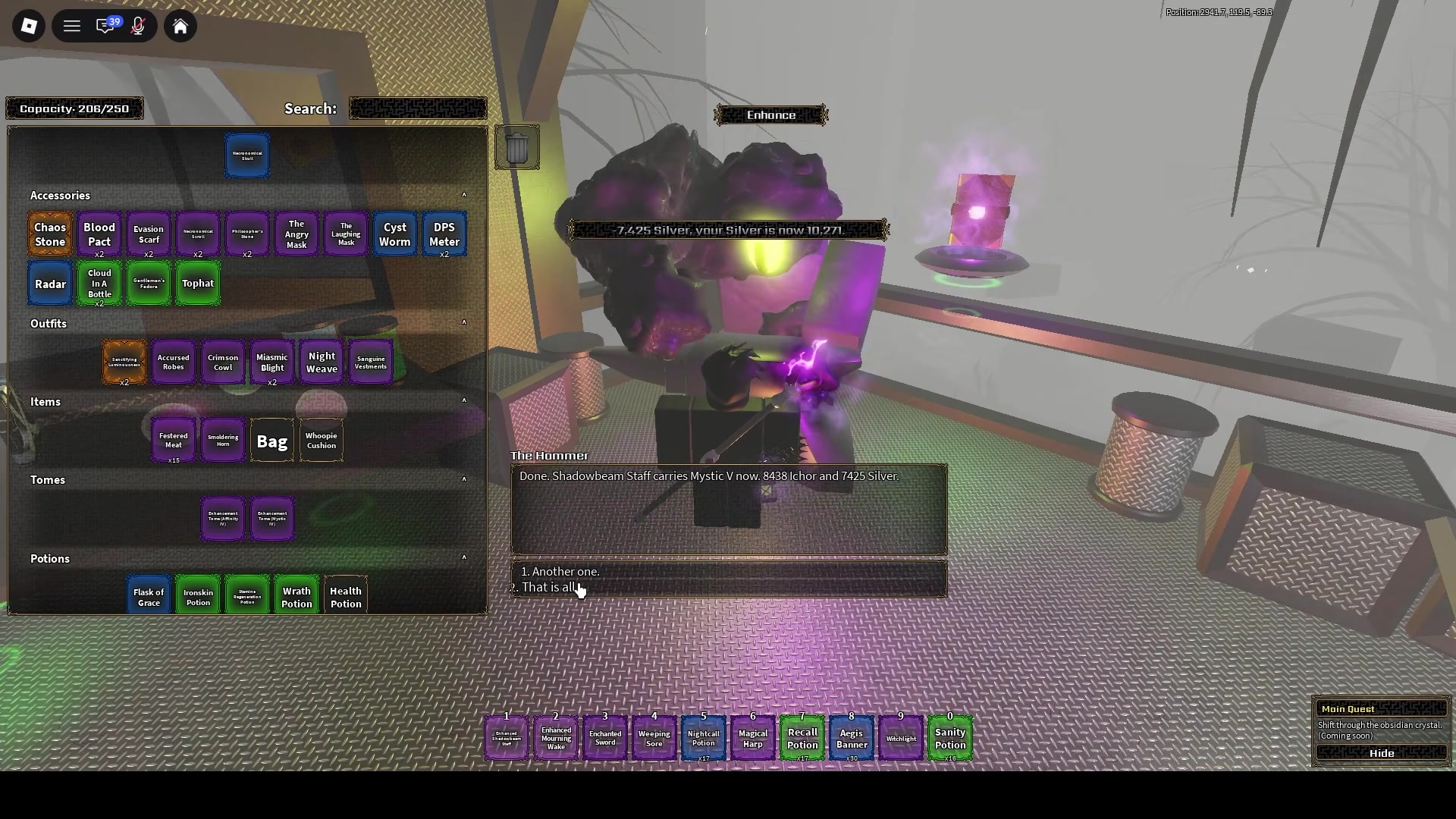
If you do not see The Hammer's confirmation dialogue, double-check that you turned in Ugly Work, ensure your gear and Tome types are compatible, and verify that you have the currencies required for your specific quote. If you still encounter issues, refer to the troubleshooting steps below.
Get More Enhancement Tomes from Paige
If you need more tomes, visit Paige, Reader of the Unwritten at the counter under the pink tree in The Twenty Shelves.
Speaking with Paige grants the quest Quiet Around The Shelves (1/2), requiring 25 qualifying enemies across the Manor, Pale, or Shrouded zones. Returning to Paige at 25/25 awards an Enhancement Tome, such as Mystic III. To repeat the quest, speak with Paige again to reacquire the task and reset your HUD counter to 0/25.
You can repeat Paige's quest to restock tomes, but individual turn-ins do not guarantee a Legendary Tome every time.
Troubleshoot Failed Tome Applications
If you cannot apply your Tome, ensure you are at The Hammer, have turned in Ugly Work, present your equipment before your Tome, match the tooltip requirements, and hold enough currency for the quote.
Confirm Correct Service NPC
Make sure you are speaking with The Hammer in The Metal Hut. Jonathan's enchanting service requires holding a gem from your Gems tab, whereas the Legendary Tomes covered here must be taken to The Hammer.
Verify Ugly Work Hand-In
Check your quest tracker to ensure Ugly Work has been formally turned in. Reaching 250/250 alien kills without speaking to The Hammer to finish the quest leaves Premium Enhancement Access locked.
Follow Exact Presentation Order
Speak with The Hammer and present your equipment first, then select your tome when prompted.
Match Tome Tooltip Restrictions
Check the tome tooltip in your inventory. A tome marked Cast weapons only, such as Mystic V, requires selecting a Cast weapon.
Audit Dual-Currency Reserves
Verify your reserves of both Ichor and Silver. Having ample Silver while lacking required Ichor will prevent the transaction from completing.
Acquire Additional Tomes
If you lack a valid tome for your gear archetype, complete Paige's assignment at The Twenty Shelves to gather fresh enhancement items.
Quick answers
Where can I find The Hammer in The Pale?
The Hammer is located inside The Metal Hut in The Pale, recognizable by the colored glowing panel beside the entrance door.
Which enemy kills count toward the Ugly Work quest?
Any alien type within The Pale counts toward the 250 requirement. Follow your active HUD counter to track your progress.
Why will Jonathan not apply my Enhancement Tome?
Jonathan's gem enchantment service requires holding a gem from your Gems tab. For the Legendary Tome usage covered on this page, you must bring the Tome to The Hammer in The Pale after completing Ugly Work.
What gear can Enhancement Tome (Mystic V) be applied to?
Its tooltip restricts enhancement to Cast weapons only, such as the Shadowbeam Staff.
Does Paige guarantee a Legendary Tome on every quest completion?
No. Turning in Quiet Around The Shelves awards an Enhancement Tome, such as Mystic III, but it does not guarantee a Legendary Tome every time.